

Teltonika RMS License TL-RMS
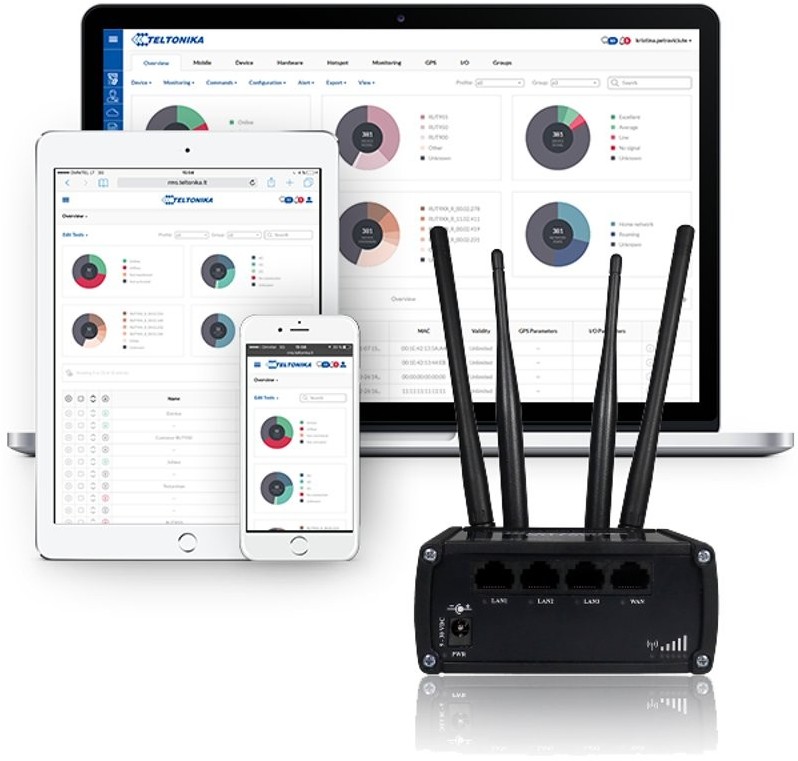
MANAGEMENT
Reach and control all compatible Teltonika Networks devices even if they don’t have Public IP
CONNECT
Access any smart devices via HTTP/HTTPS or SSH & configure them using WebUI or CLI as if you are in front of them
REMOTE DESKTOP
Control laptops, desktop, industrial computers and other devices running Windows or Linux via RDP or VNC – remotely
API
Transfer the functionality you want from RMS into your own IoT Platform
FOTA
With RMS you can ensure availability and security of your devices with automated firmware updates over-the-air
ALERTS & REPORTS
Make informed operational decisions and stay up to date with your connected infrastructure solutions
The Remote Management System (RMS) by Teltonika Networks allows you to be in control of your connected solution and consists of three main parts:
// RMS MANAGEMENT gives you full control over your fleet of Teltonika Networks routers & gateways, ensuring their security & availability.
// RMS CONNECT allows you to reach and control other smart devices remotely, even without Public IP.
// RMS API helps you to take what you need from RMS and implement it into the IoT platform of your choice.
PLC ACCESS TOINDUSTRIAL SERVERS
// Continuously monitor the state of input devices and automate processes based upon a custom program to control the output equipment; all while collecting data.

REALTIMEALERT SYSTEM
// Use real-time email alerts to stay informed on what’s happening to your devices. Special alerts can be configured for various events, such as mobile signal strength falling below a certain threshold, status changes, or device leaving/entering a defined GPS geofence.

ACTIVITYREPORTS
// Set up a custom report system that contains information on relevant device parameters. Reports can be generated periodically or whenever needed. All generated reports are stored on RMS servers and can be downloaded at any point for future analysis.
 | Centralized system Access, monitor and control whole router fleet from within a single, web browser-based interface. Compatible with browsers across all platforms, requires no installation or additional plug-ins. |
Firmware and configuration updates Deploy your desired configuration template or new firmware version to multiple units or groups of units at the same time. Over-the-air bulk upgrade and configuration significantly reduces the costs of system maintenance. |  |
 | Accessibility and security Your routers will not be dependent on having a public IP address for remote access, decreasing maintenance costs and increasing effectiveness. Communication between routers and main server is secured by hardcoded OpenVPN connection, which requires no configuration and protects communication channel from tampering. |
Maintenance and diagnostics Users receive information that helps them to visualize the unit’s location and check performance indicators like temperature, signal strength and all device details. For proactive diagnostics – remotely reboot devices, download troubleshooting or system event files for in-depth health analysis. |  |
 | Statistics Improve overall performance and efficiency of your whole network based on conclusions of reporting tools that allow creation of custom reports related to device availability, performance and exceptions. Actively know how your network is behaving. |